
What if the QR code on your product looks polished but sends customers to an outdated page, or won’t scan under ordinary lighting? For businesses choosing qr code stickers for products, the code’s destination and the printed label both need careful planning.
A QR sticker should do more than sit neatly on the packaging. It needs to scan reliably, make its purpose clear and take customers to useful content, whether that’s care guidance, product details or support information. Plan the destination, code size, contrast, placement and sticker format before artwork goes to print. If the destination may change, a dynamic QR code can allow the linked URL to be updated, whilst a static code cannot.
This guide explains how to plan a practical customer journey, prepare print-ready artwork and test the code on the product surface. You’ll also learn how bespoke label printing can bring the QR code into a consistent branded design, so the finished sticker is clear and useful in real-world use.
Key Takeaways
- Give customers a clear reason to scan by linking to useful content such as instructions, ingredient details or support.
- Understand the difference between a static QR code and a managed redirect before choosing a destination for qr code stickers for products.
- Build the code into the label artwork with strong contrast, clear space and dimensions suited to the product and scanning distance.
- Use a pre-print checklist to review the destination, artwork, label dimensions, placement and scan test.
- Bring your approved QR code and product context into a bespoke label design that keeps the code clear and the branding consistent.
How product QR stickers enhance the customer journey
A product QR code sticker is a printed label that customers scan with a smartphone to move from physical packaging to digital content. The code can open a web page without asking someone to type a long address, giving the product a useful next step beyond the information that fits on its label. A QR code is a two-dimensional barcode that stores information in a pattern a compatible device can read.
That connection can support customers before and after purchase. A short label can point to fuller guidance online, while the product packaging remains clear and easy to read. The destination should make the scan worthwhile: a code is not useful simply because it is present.
Where product QR stickers add value
Consider what a customer might need once the product is in their hands. A QR code could lead to care instructions for a garment, setup guidance for a household item, ingredient details for a food product, or registration and support information for equipment. It can also introduce the product’s story, such as its materials or making process, when that information helps customers understand what they have bought.
Choose content that answers a real question. A product page focused on another sale may suit a promotion, but it can frustrate someone who has scanned the label to find operating instructions. Make post-purchase information easy to locate and read on a phone. If details change, keeping the linked page current makes a compact printed label a route to fuller guidance without requiring every instruction to appear on the packaging.
Start with the customer action
Before creating the code, picture the person holding the product. Are they scanning it in a shop, during setup at home, or later when they need help? Their situation shapes what they need next. A shopper comparing products may value ingredient or product-story details; a customer unpacking equipment is more likely to want clear setup steps.
Give the code one main job and make the destination match. If the goal is registration, link to the registration process rather than a general homepage. If customers need instructions, take them directly to the relevant guide. A focused destination reduces extra searching and makes the experience feel intentional.
- For guidance: “Scan for care instructions” tells customers what they’ll find.
- For registration: “Register your product” sets a clear expectation.
- For support: “Scan for help and troubleshooting” points customers towards assistance.
Place a brief prompt near the code so its purpose is visible before anyone scans. Keep that promise accurate: if the label says “View ingredients”, the link should make those details straightforward to find. This alignment between the printed message and the digital destination helps qr code stickers for products feel like a considered part of the customer experience, not an unexplained symbol on the pack.
How product QR codes work, from destination to customer scan
A QR code links the printed product to a digital destination, but the code and the page it opens are not the same thing. The code stores data, often a web address, and a phone reads that data before opening the corresponding webpage. Understanding this distinction helps you choose a setup that still works if your content changes.
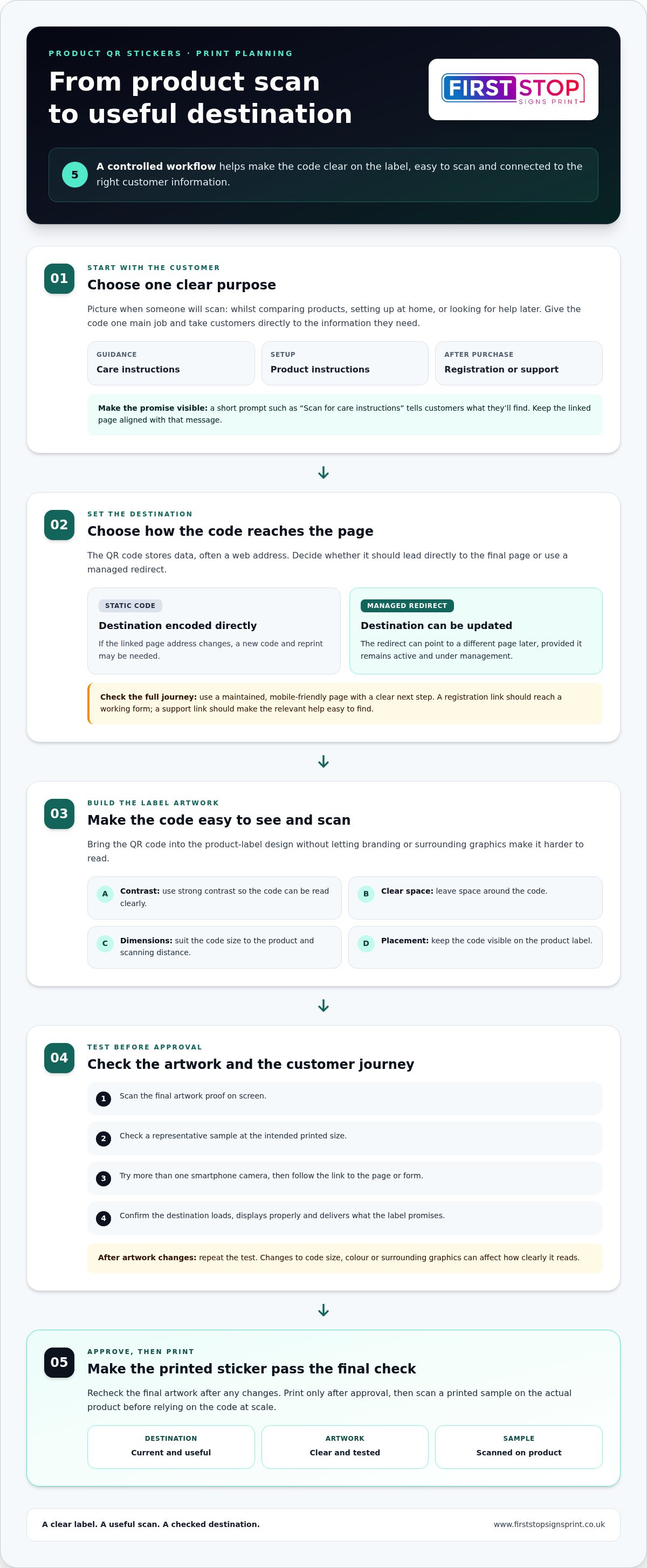
For qr code stickers for products, use a controlled workflow before approving a print run:
- Select the destination. Choose a page that answers the customer’s immediate question and works well on a mobile screen.
- Generate the code. Decide whether it should encode the final page address directly or point to a managed redirect.
- Add it to the artwork. Place the code and a clear prompt within the product-label design, leaving the code easy to see.
- Test the artwork. Scan the proof and check that the correct page opens and the customer can complete the intended action.
- Print only after approval. Recheck the final artwork after any changes, then test a printed sample before relying on the code at scale.
Choose a stable, useful destination
A static code encodes its destination directly, so changing the linked page address may require a new code and a reprint. A managed redirect instead sends the scan through a web address that can point to a different page later. Updates are possible only while that redirect remains active and under management. In either case, use a maintained, mobile-friendly page with a clear next step, not a generic landing page that leaves customers searching.
Check the complete path, not just whether the code scans. For example, a registration link should lead to a working form, and a support link should make the relevant help easy to find. If a third-party redirect service is involved, understand that the destination depends on its continued management. Keep ownership and renewal arrangements clear so the printed code doesn’t become a dead end.
Test the code before approving artwork
Start with the final artwork proof on screen, then check a representative sample at the intended printed size. Try more than one smartphone camera and follow the link through to the page or form. A successful scan is only the first check: confirm that the destination loads, displays properly and delivers what the nearby label copy promises.
Repeat the test after artwork revisions. Changes to the code’s size, colour or surrounding graphics can affect how clearly it reads, so don’t rely on an earlier proof. Once printed, scan a sample label on the actual product, particularly if the surface or shape differs from a flat sheet. This practical check can catch placement or presentation issues before labels are applied more widely.
Once the destination and artwork are approved, bespoke label printing can bring the code into a coherent product design, with the scan prompt and brand elements considered together.
QR code sticker design: make product labels easy to scan
A well-designed QR code must work within the label, not just look tidy on screen. Strong contrast between the code’s dark modules and its light background helps a phone camera distinguish the pattern. Leave clear space around all sides, and keep logos, text, borders and illustrations outside that area. Busy artwork close to the code can make its edges harder to identify.
There’s no single code size that suits every product. Consider how far away a customer will hold the pack, how much label space is available and whether the product is likely to be scanned in a shop or at home. Use technical guidance from the QR code generator or relevant standard for the code you’re creating, then test the artwork at its intended size. Don’t shrink it to make room for decoration without checking readability.
Balance branding with QR code readability
Keep the code visually distinct, even when the label carries a strong brand identity. A short instruction or benefit can sit beside it, but should not intrude on the clear area. A branded colour palette can still work around a code, provided the foreground and background remain easy to tell apart. For further considerations when planning a sticker, see this professional vinyl sticker printing guide.
White and transparent backgrounds behave differently. White gives the code a consistent light field, while a transparent label lets the product surface show through. On a dark, patterned or unevenly coloured surface, transparency may reduce contrast, so a solid light area behind the code can make the design clearer.
| Design consideration | What to assess | Practical direction |
|---|---|---|
| Contrast | Can the code’s light and dark areas be distinguished? | Use a clear tonal difference; avoid low-contrast colour combinations. |
| Available space | Can the code and clear border fit without crowding? | Allow room around the code and its nearby instruction. |
| Surface | Is the product background light, dark, plain or patterned? | Choose a solid backing or transparent treatment to preserve readability. |
| Handling | Will the label face rubbing, moisture or frequent contact? | Consider how wear or marks could affect the printed code during use. |
Choose a label format for the product
Assess the surface before settling the artwork. A flat carton offers a different design area from a curved bottle, and a label placed where fingers often grip the product may be harder to scan or keep clean. Consider likely handling and exposure as part of the brief, rather than treating material and finish as universal choices. The same design principles apply to other printed formats: keep key information easy to distinguish and give each element room to work.
Good qr code stickers for products bring the code, brand and product surface into one considered layout. A bespoke label design can help balance those elements, while leaving the code prominent enough for customers to find and scan.
How to prepare QR code stickers for products before printing
A clear brief helps turn a working QR code into a label that suits the product and its customers. Before arranging bespoke label printing, gather the destination, approved code artwork and product details. Keep artwork readiness separate from print specifications: the design can be ready for review whilst dimensions, material and other production details are agreed for the particular job.
Build a clear product-label brief
Record what the product is, where the label will sit and what customers should be able to do after scanning. Note the destination and whether different product versions need different information. For example, separate flavours, models or language versions may call for distinct links or clearly differentiated artwork. This helps prevent the wrong code being paired with a product variation.
Include the final approved code artwork and brand assets in the design workflow. If the destination may change, explain how the link is managed so the printed code continues to serve its purpose. Also outline the intended quantity and range of products. These details inform the print brief, while technical production specifications are established for the particular job rather than assumed.
Approve the final design with confidence
Review the label as a whole, not as separate files. Check the destination, spelling, brand details, code clarity and placement together. The code should remain easy to distinguish from nearby graphics, and its position should make sense on the actual product. A design that looks balanced on a flat screen may feel crowded on a small or curved pack.
Use this pre-print checklist to catch common problems:
- Destination: Open the link and confirm it leads to the intended, maintained page.
- Code artwork: Check that the approved code matches that destination and hasn’t been altered in a way that affects its pattern.
- Label dimensions: Review the overall label size and whether the code has enough room to remain clear.
- Placement: Check that the label sits on a suitable area and won’t be obscured by a seam, grip or product feature.
- Final scan test: Scan the final proof or sample at its intended size and realistic viewing distance, then follow the link to check the complete journey.
Broken links, weak contrast, crowded artwork and codes that haven’t been tested at final size are avoidable sources of trouble. Make a fresh scan test after revisions, especially if the code, its surroundings or its position have changed. Keep an approved reference copy of the artwork and destination details. That gives future reprints a reliable version to compare against and makes it easier to spot if a product link or design has since changed.
First Stop Signs Print provides bespoke product label printing, bringing the QR code and your branding together in a considered design. Explore bespoke product label printing.
Bespoke product QR code stickers with First Stop Signs Print
Once the destination and code artwork are ready, bespoke label printing brings them together with your product branding. First Stop Signs Print provides label and packaging printing, with design and print solutions to help businesses create a coherent route from the physical product to useful online content. The brief should account for both how the label looks and how customers will use it.
From QR artwork to a printed product label
A considered process helps keep the design clear from the first brief through to production. Share the product details, intended label location, approved destination and brand assets. These give the artwork a practical context, whether the code sits on a carton, bottle or another product surface. The label can then be designed around the code rather than squeezing it into the layout at the end.
- Provide the brief: Explain the product, intended customer action, label position and any product variations.
- Prepare the artwork: Bring the QR code, brand elements and supporting label content into one design.
- Review the proof: Check the visual hierarchy, code placement, wording and destination together.
- Proceed with production: Once the design is approved, move to printing with the project requirements defined.
Every detail has a role. The code should be prominent enough to find, while the branding and product information still feel balanced. The label’s position should also suit the product’s shape and everyday use. A finished proof needs both a visual review and a scan check, so the design looks consistent with the brand and the code still takes customers where intended.
Plan your next product-label project
Before starting, gather the destination link, product details and current brand assets. Note what you want customers to do after scanning, such as viewing guidance or accessing support, and describe where the sticker will appear. If the product has variations, identify which versions share a destination and which need distinct codes or artwork. This gives the print brief a clear purpose from the outset.
Quantities, label dimensions, materials, finishes and timings depend on the needs of the individual project. The product surface, intended placement and expected handling help shape those decisions; they shouldn’t be assumed from one label job to another. A complete brief gives the design and print process the context it needs without treating a particular specification as suitable for every product.
With these details in place, qr code stickers for products can become part of a recognisable, useful product label rather than an afterthought. Discuss your bespoke product-label printing project with First Stop Signs Print and share how customers will use the code and where the sticker will appear.
Make your next product label work harder
A printed label can keep connecting with customers long after the packaging leaves the shelf. Treat its QR destination as part of the product experience: keep the content relevant as your range develops, and make sure each label continues to match the product it represents. That care helps a simple scan remain useful rather than becoming a forgotten link.
Good preparation gives the printed design a clear job. Bring together the product context, brand presentation and intended customer action, then shape them into one practical brief. First Stop Signs Print provides commercial label and packaging printing, with bespoke design and print solutions in the UK, to help bring that brief to life as a considered product label.
Ready to give your packaging a clear, branded route to useful digital content? Start planning your bespoke product label printing project and turn your idea for qr code stickers for products into a practical next step. With a clear purpose and thoughtful design, your label can make the product easier to understand and your brand easier to remember.
Frequently Asked Questions
Can QR code stickers for products link to instructions or product information?
Yes, a product QR code can open a mobile-friendly page with instructions or other information. For example, a small appliance label could direct owners to a troubleshooting guide, whilst a food product could link to details about allergens. Before printing, follow the link as a customer would: scan the code, check the page loads on a phone and confirm the relevant information is easy to find.
How big should a QR code sticker be to scan reliably?
There isn’t one size that suits every label. The required dimensions depend on scanning distance, how much information the code holds, print quality and the surface it’s applied to. A code on a small item may need different treatment from one on a larger pack scanned at arm’s length. Test it at its final printed size, and verify precise dimensions against reliable technical guidance before approving the artwork.
Can I change the link on a QR code sticker after printing?
That depends on how the code was created. A static code contains its destination directly, so changing the page address generally means generating and printing a replacement code. A managed redirect can point scans to a new destination, provided the redirect remains active and someone continues to manage it. Before committing to a print run, understand who controls the redirect and what happens if the service or account ends.
Do QR code stickers work on transparent product packaging?
They can, provided the code remains distinct from the background. Transparent material may show the product, contents or graphics beneath the label, which can reduce contrast or create visual clutter. A clear label placed over a busy surface may therefore behave differently from one on a plain background. Test the printed sticker in its actual position on the filled or assembled product, not just on a blank proof.
How do I test QR code stickers before printing a full product run?
First, open the destination directly and check that it’s the correct page. Scan the final artwork at its intended printed size, using more than one phone, then confirm the page works and the customer can complete the intended task. If possible, test a sample on the product itself. Repeat the checks after any artwork change, particularly if the code’s size, colour or position has been adjusted.
Can a QR code sticker include a logo and still scan?
Yes, branding can be included, but the code’s readability must come first. Keep the logo outside the clear space around the code, and avoid placing fine graphics or text across its pattern. Maintain a strong difference between the code and its background. Then scan the complete design at its intended size and on the product surface. If it struggles to read, simplify the artwork or adjust the layout.
What should I include in a brief for product QR code stickers?
Include the product type, label position, intended customer action, destination link and brand assets. Describe relevant conditions too, such as a curved surface, frequent handling or exposure to moisture, so the design reflects real use. Identify product variations that may need separate codes. Supply approved code artwork through the design process, then review the proof and scan the final design before production to catch mismatches early.


