
The most eye-catching label isn’t necessarily the most professional one. A design can look polished on screen yet print poorly, sit awkwardly on its packaging or make important details difficult to read. Knowing how to get professional product labels starts with matching their purpose, size, material and finish to the product and how it will be stored, handled and displayed.
It’s understandable to feel unsure about which specifications to choose or whether your artwork will print as intended. A clear brief makes those decisions easier and helps balance brand presentation with readability and practical use. This guide covers what to prepare before ordering, including label dimensions, application, artwork checks and print specifications.
Design, production and printing all contribute to a consistent result. First Stop Signs Print provides commercial label printing as part of its broader print and packaging services, bringing a considered label design through to production.
Key Takeaways
- Professional labels balance clear information, suitable construction and consistent brand presentation.
- Compare paper and synthetic stocks against the product surface, handling needs and expected environment before choosing a material or finish.
- To understand how to get professional product labels, define the label’s purpose and specifications before finalising artwork.
- Set the label’s dimensions, orientation and placement early so the design fits its intended use.
- Review the proof for visual details and print specifications separately before approving production.
How to Get Professional Product Labels That Work for Your Brand
Professional product labels combine clear information, suitable construction and consistent brand presentation. If you’re working out how to get professional product labels, begin by deciding what the label must do, not just how you want it to look. A well-planned label helps customers recognise a product, find key details and understand the brand at a glance.
Independent makers, retailers and established product businesses can all benefit from labels designed around their products and customers. A jar displayed on a shop shelf may need a strong brand presence and an easy-to-scan product name. A label used mainly for identification or instructions may need to give those details priority. For an overview of what a product label is and the roles labels can play, see Wikipedia’s background on the subject.
For a visual introduction to creating a label design, watch this tutorial:
What makes a product label look professional?
Professional design gives information a clear order. A visible brand mark establishes recognition, a legible product name tells shoppers what they’re looking at, and supporting details are arranged so they’re easy to find without crowding the layout. Purposeful colour can reinforce brand identity and draw attention to important information, whilst consistent type styles make the overall design feel considered.
Good looks alone aren’t enough. The layout must suit the product, its packaging and the way people will read or handle it. For example, a small jar label could place the brand mark at the top, the product name in the most prominent position and key details in a clear, readable area. This hierarchy helps shoppers scan the label without sacrificing presentation.
Start with the product and the label’s job
Before designing, decide where the label will appear and what a customer should understand first. Is its main role to build brand recognition, identify the product, provide instructions or present product information? Some labels do several jobs, but setting a priority helps prevent the design from becoming crowded or confusing.
Write down the essentials before artwork begins:
- Audience: who needs to notice or use the label?
- Application: where will it sit, and how will the product be displayed or handled?
- Purpose: what should the label communicate first?
- Content: which details must appear, and which are secondary?
Purpose, application and artwork readiness are the three essentials behind a professional product label. This brief gives design and production a clear starting point, helping the finished label support your brand and the product’s everyday use.
Choose Product Label Materials and Finishes for Their Intended Use
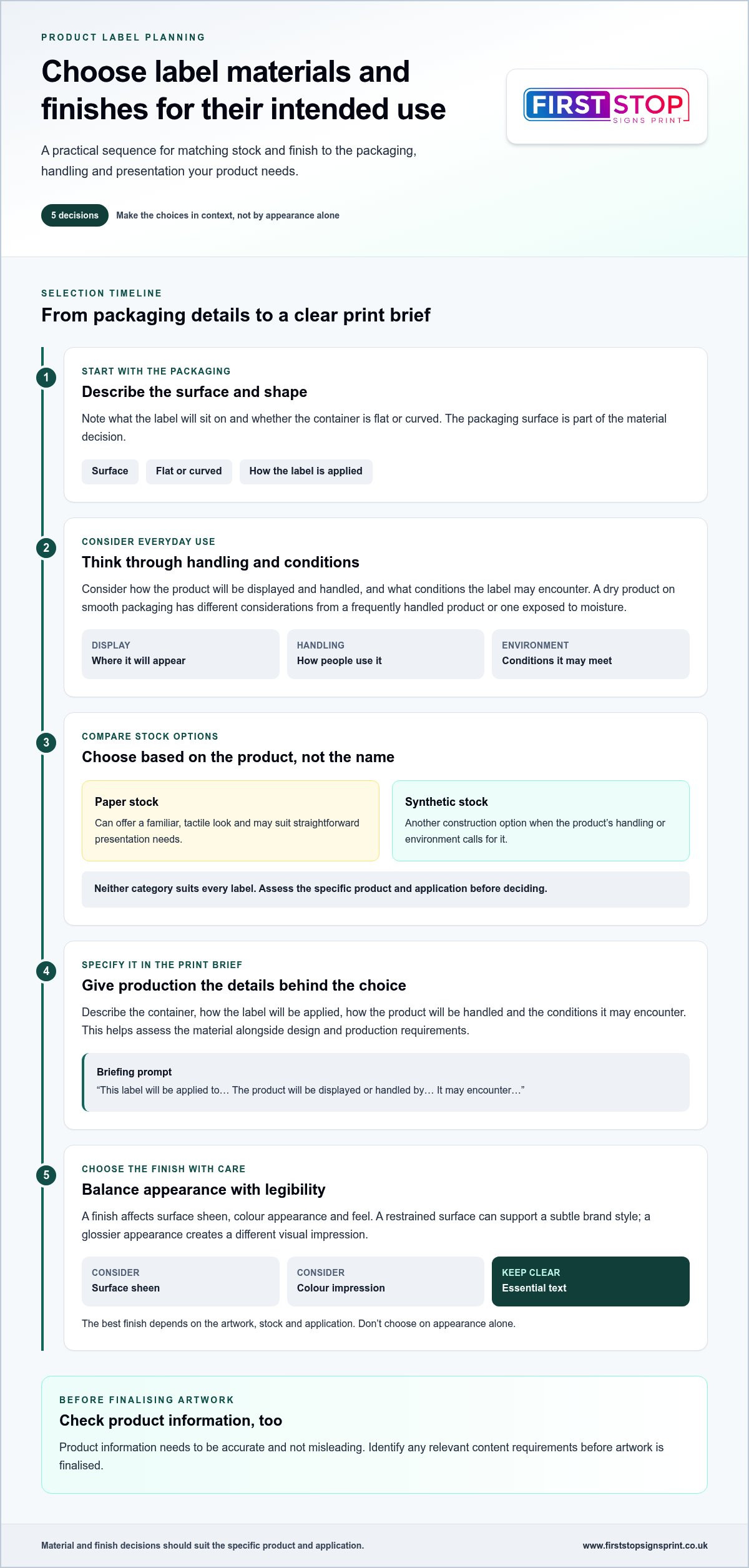
The right label stock depends on more than appearance. Consider the container’s surface, how the label will be applied, how the product will be handled and the conditions it may encounter. A label for a dry product on smooth packaging has different considerations from one used on a frequently handled product or one exposed to moisture. Treat these as starting points, not guarantees: the material needs to suit the specific product and application.
How should you choose a label material?
Paper stocks can offer a familiar, tactile look and may suit straightforward presentation needs. Synthetic stocks provide another option when the product’s handling or environment calls for a different construction. Neither category suits every label. Describe the packaging surface and intended use in your print brief so the material can be considered alongside the design and production requirements.
Think through the full journey: how the label will be positioned on the container, whether the surface is flat or curved, and how customers may handle the product. These details help narrow the choice more effectively than relying on a material name alone.
Do finishes change how product labels look?
Yes. A finish affects the surface’s sheen, the way colours appear and the feel of the label. A restrained surface may support a subtle brand style, whilst a glossier appearance creates a different visual impression. The best choice depends on the artwork, stock and application. Keep essential text easy to read, and don’t choose a finish on appearance alone.
Product information also needs to be accurate and not misleading. For UK-specific guidance, consult the government’s overview of UK product labelling laws and identify any relevant content requirements before finalising artwork.
Use this comparison to make your print brief more specific:
| Use case | Decision factor | Point to discuss in the print brief |
|---|---|---|
| Paper stock for a considered product presentation | Surface character and packaging conditions | Describe the container, how the label is applied and how the product is handled. |
| Synthetic stock for a different handling or environmental need | Fit with the product’s actual use | Explain the conditions the label may encounter; don’t assume a stock is suitable without assessing the application. |
| A chosen finish for a particular brand impression | Appearance, colour impression and text legibility | Specify the look you want and identify the information that must remain clear. |
A clear brief brings these choices together before production. First Stop Signs Print provides commercial label printing alongside design and production, helping align practical requirements with presentation. Explore commercial label printing as you plan how to get professional product labels suited to their intended use.
Prepare Label Artwork and Print Specifications Before You Order
A well-prepared brief helps turn a label idea into artwork that can be checked and produced accurately. If you’re learning how to get professional product labels, settle the content, dimensions and placement before finalising the design. Changing the label’s shape or size late in the process can affect the layout, text size and space available for essential details.
What information belongs in a product label brief?
Gather the practical details first. Note the product, where the label will be applied, the quantity required and the brand presentation you want. Include the final wording and clearly mark any content that must appear, so it can be arranged rather than squeezed in later. Product labelling requirements vary by category, so check relevant UK product labelling laws before approving copy.
How can you make artwork easier to print?
Use the label’s final dimensions and orientation as the basis for the artwork. Decide where it will sit on the packaging, including how it aligns with edges, seams or other design features. Keep important text and logos comfortably inside the trim area. Bleed and safe-area requirements vary by production process, so follow the printer’s guidance rather than relying on generic settings.
Resolution, colour setup and file format also depend on the printer’s specifications. Supply artwork in the requested format and check that images and logos remain clear at the actual label size. Small text that looks readable when enlarged on screen may be difficult to read once printed. Check colour contrast, spelling and punctuation at the intended size as well.
Print-ready artwork aligns the design, final size and production requirements. Use this workflow to bring those elements together:
- Gather the content: collect final copy, product details and any required information.
- Define the application: record the packaging surface, label position, orientation and how the product will be handled.
- Set the specification: confirm dimensions, shape, quantity, stock and finish for the brief.
- Build the design: prepare the layout at the agreed size, with essential text clear of trim edges.
- Review the file: check wording, legibility, contrast, image quality and logos, then compare the file setup with the printer’s production requirements.
This sequence helps prevent avoidable artwork changes and gives design and production a shared reference. First Stop Signs Print brings design, production and commercial label printing into a coordinated process. Explore commercial label printing as you prepare your brief and artwork for production.
Check a Product Label Proof Before Printing the Full Order
A proof is your chance to catch errors before the approved design moves into production. It lets you review the layout and wording, but a digital proof may not show the finished stock’s texture or reproduce printed colour exactly. Treat it as a careful artwork check, not a complete substitute for seeing how the chosen material and finish will look.
What should you check on a label proof?
Review the proof in two passes. First, focus on what customers will see. Then compare the technical details with your approved brief.
- Visual checks: confirm spelling, product details and logo placement. Check that type is legible, elements are aligned and there’s enough contrast between text and its background.
- Size and placement: compare the displayed dimensions with the intended product surface. Consider how the label will sit on the packaging and whether the orientation matches how the product will be presented.
- Information and trim: make sure essential details are visible and comfortably clear of the trim edge. Check that no text or important design elements appear clipped or crowded.
- Specification checks: confirm the label size, shape, orientation, stock, finish and quantity against the agreed print details.
Review at a practical viewing size as well as zooming in for fine detail. A label can look balanced on a large screen yet feel crowded at its actual size. If the proof is displayed with dimensions or a packaging mock-up, use these to assess fit, but remember that a screen representation doesn’t fully reproduce the physical label.
How can you reduce avoidable print revisions?
Prepare the approved copy, logo files and other design assets before artwork is laid out. Keep one clear version of the final specifications, so everyone is reviewing against the same details rather than scattered notes or earlier drafts.
If something needs changing, describe it precisely. For example, identify the wording to amend or the element to reposition, and state where it should go. Then review the revised proof from the beginning, not just the part that changed. A small edit can affect spacing, alignment or nearby information.
Clear proofing is a practical final step in how to get professional product labels. First Stop Signs Print brings design, production and commercial label printing together. Arrange commercial label printing with your approved artwork and specifications ready for review.
Get Professional Product Labels Printed Through a Clear Workflow
Getting labels ready for print is easier when each decision follows a clear order: define the label’s job, choose specifications that suit its application, prepare the artwork and review the proof. This is the practical answer to how to get professional product labels without leaving important details until production is under way.
What to include when requesting professional label printing
A concise project brief gives the design and print process a shared starting point. Include:
- Product and application: what the label is for, where it will be placed and how the product will be handled.
- Dimensions and quantity: the intended label size and the number required.
- Artwork status: whether you have finished artwork, existing brand assets or a design that needs preparing.
- Visual direction and content: the brand style you want to maintain and the product information that needs to appear.
- Open specification questions: anything you’d like to resolve about material, finish or print requirements.
Share approved wording and current logo files where available. A precise brief keeps decisions focused on the product’s actual use, rather than assumptions about its packaging or presentation.
Turn a prepared brief into a finished label
When design and production are considered together, choices about layout, stock and finish can be assessed against the same requirements. This helps keep the artwork aligned with the label’s intended size and role, and makes the proof easier to review against the brief. First Stop Signs Print provides commercial label and packaging printing, with design and production as part of its print workflow.
Some label-like applications may call for a different format. If you’re considering that route, read our guide to professional vinyl sticker printing. For wider brand consistency across product packaging and your business premises, our guide to bespoke business signs offers another useful perspective.
With your requirements, artwork and proof aligned, you’re ready to take the next step. Explore First Stop Signs Print’s commercial label and packaging printing to bring your prepared brief into a coordinated design and print process.
Bring Your Product Label Brief to Life
Knowing how to get professional product labels means treating each choice as part of one process. Start with the label’s purpose and application, then select suitable specifications, prepare artwork to the agreed size and review the proof carefully before production. A clear brief keeps brand presentation, readable information and practical use aligned.
First Stop Signs Print provides commercial label printing and packaging printing, with design and production forming part of its broader print services. This coordinated approach helps move a considered brief towards a finished label that supports your product’s presentation.
Ready to take the next step? Explore professional label printing with First Stop Signs Print and start planning labels that fit your product and brand.
Frequently Asked Questions
How do I choose the right material for product labels?
Choose a label material by starting with the product surface, how the label will be applied and how the product will be handled. Then compare paper and synthetic material categories against those conditions and the look you want. Neither is automatically right for every product. Include details about the packaging and application in your print brief, so material choices can be considered alongside the label’s purpose and presentation.
What file format should I use for product label artwork?
Use the file format specified for the printer’s production workflow, as there isn’t one format that suits every job. Prepare your design at the final label dimensions, check that images and logos remain clear at that size, and keep essential details safely inside the trim area. Before submitting, review spelling, colour and small text at the intended size. Following the supplied artwork specifications helps prevent avoidable file changes.
How do I make sure product labels are readable?
Make product labels readable with a clear order of information, strong contrast and type that remains legible at the label’s actual size. Keep essential details uncluttered and away from trim edges. Review the proof at its final dimensions, then compare the layout with the product surface to check that the design will be easy to view in use. If category-specific requirements apply, verify them before approving the artwork.
Should I approve a proof before printing product labels?
Yes, review and approve a proof before production. Check spelling, product details, logo placement, alignment, legibility and dimensions against your approved brief. A digital proof is useful for reviewing layout, but it may not fully represent the finished material or printed colour. If you request changes, describe them precisely and review the revised proof carefully before approval, including details that may have shifted as a result of the amendments.
What information should I give a label printer?
Give the label printer the product type, label purpose, packaging surface, final dimensions and required quantity. Include approved copy, brand assets and the visual style you’re aiming for. If you have preferences about material or finish, include those too, along with any questions about print specifications. Flag product information that must appear on the label. A clear brief helps design and production stay aligned with the label’s intended use.
Do UK product labels have to include specific information?
Yes, some products must display specific information, but the requirements depend on the product category and applicable rules. Don’t rely on a general checklist for every product. Use current, authoritative UK guidance, including the relevant GOV.UK product labelling guidance, to identify what applies before finalising your copy. Then include the required details in the brief and check that the approved proof presents them clearly and accurately.


