
Could a small raised detail make your packaging feel more distinctive without getting in the way of the information customers need? That’s the potential of embossed labels for packaging: a tactile finish can draw attention to a logo or another chosen detail, but it works best when it supports the design rather than competing with it.
If you’re unsure how embossing changes a label or how to describe your idea for print, it helps to start with the label’s purpose. The finish affects both the look and feel of the packaging, so consider legibility, layout and how the label will be used before settling on a design. This guide explains embossing, compares it with debossing and foil, and shows how to prepare artwork and a clear print brief. You’ll also find practical ways to balance tactile impact with everyday use, alongside information about First Stop Signs Print’s label and packaging printing services.
Key Takeaways
- Use embossed labels for packaging to add a raised tactile detail where it supports the product and brand.
- Compare embossing, debossing, foil and flat print by the effect you want and the role each finish should play.
- Plan the label around its size, packaging purpose and essential information so decorative details don’t compromise readability.
- Mark the areas intended for a tactile finish clearly in a separate artwork layer or file.
- Prepare a concise brief covering your product, audience, packaging and brand priorities to guide label design and production.
What are embossed labels for packaging, and what do they add?
Embossing creates a raised area by shaping the label surface. Rather than adding depth with ink alone, the process gives selected parts of the design a physical profile that can be seen and felt. On packaging, that might be a logo, a border or a simple emblem. Used with purpose, the raised detail can help a brand mark stand out and give the label a distinctive character. It doesn’t automatically signal product quality: its effect depends on how well it suits the product and the overall design.
Embossing is physical texture in the label surface, not colour or printed shading that only gives the impression of depth. This distinction matters when preparing artwork. A shaded illustration can look raised on screen, but it won’t create a tactile feature on the finished label. For a general overview of labels and their uses, see Label (Wikipedia), which also refers to embossing and faux embossing.
How an embossed packaging label looks and feels
With embossing, selected areas stand proud from the surrounding surface. Run a fingertip over the label and you can feel the raised shape; turn it towards the light and its contours may cast small shadows or catch highlights. The effect changes with the viewing angle and lighting, so the same detail can look subtle in one setting and more pronounced in another.
A flat printed illustration can imitate a raised edge through gradients, outlines or shadows, but the surface remains even. Embossing adds a physical change, giving the design another way to attract attention. From further away, a fine motif may be difficult to distinguish, while a clear logo or border can still create a recognisable outline. The best result is not necessarily the deepest or most elaborate: it’s the detail that remains legible at the distances customers are likely to see the pack.
When does embossing suit a product label?
Embossing can suit a product when a tactile brand mark supports the intended presentation. A raised logo can create a considered focal point; an embossed border can frame key artwork, while a simple emblem can add character without filling the label with extra detail. These treatments work best when the layout leaves enough space for the feature to register.
Keep the focus selective. If text, illustrations and decorative features all compete for attention, embossing a crowded label may make the hierarchy harder to follow. Start by identifying the one element that should draw the eye or invite touch, then consider whether raising it helps customers recognise the brand or understand the product. Leave essential information clear and easy to scan. This way, the tactile detail supports the packaging’s purpose instead of distracting from it.
How does embossing create texture on a packaging label?
Embossing forms a raised design by physically shaping the label surface. In a conventional process, pressure applied through shaped tooling changes the surface profile. The production method and level of detail can vary by job, so the artwork should communicate the intended effect clearly. Don’t assume every fine line will translate exactly as it appears on screen.
Embossing changes the label’s surface; ink changes its colour. A printed shadow or gradient can suggest depth visually, but it leaves the surface flat. Embossing creates a physical feature that can be seen in its contours and felt by touch. Colour can make that feature more prominent, but the colour and raised area are separate parts of the artwork.
Complexity matters. Tight clusters of detail can lose definition when shaped into a small area, and very fine lines may be difficult to distinguish at the finished label size. Strong contrast between the focal feature and the surrounding design can help the eye find it, but contrast alone won’t create texture. Plan for the label’s actual dimensions and viewing conditions, not just an enlarged on-screen preview.
Which parts of a label design can be embossed?
Logos, short lettering, borders and simple graphic elements can provide clear focal points. Selective emphasis gives the label a visual order: customers can notice the brand mark before taking in the supporting text. Raising too many elements, by contrast, may make the design feel busy and weaken the impact of the detail you most want people to notice.
Review thin strokes, small lettering and intricate motifs at the intended finished size. A feature that looks crisp when enlarged may merge with nearby detail on a compact label. Keep the proposed tactile area distinct in the artwork, and check how it sits alongside the product name and other essential information.
How do embossing and printed effects work together?
Treat the raised feature as its own design instruction, separate from printed colour, shading or simulated texture. A coloured logo can be embossed, for example, but the ink supplies the colour while the embossing supplies the raised profile. A flat printed texture may look rough or dimensional in an image, but it won’t physically change the surface.
For a clear handover, identify the intended tactile area in a separate layer or file and label it plainly. Make sure the visual artwork and the embossing instruction align, so there’s no ambiguity about which shapes should stand proud. Keep small details purposeful and don’t use a shadow effect as a substitute for a production instruction. How finishes can be combined depends on the production setup, so plan the overall appearance as one considered design rather than assuming every effect can be layered together.
Clear artwork is a practical starting point for packaging print. If you’re developing a label concept, explore label and packaging printing as part of planning the design and production brief.
Embossing, debossing or foil: which packaging finish fits your brief?
The right finish depends on what you want customers to notice and the character your packaging needs to express. Embossing adds raised relief, debossing presses a design into the surface, foil catches light with a reflective accent, and flat print communicates colour and detail without physical relief. None is automatically the best choice. Use the comparison below to match the finish to a clear design purpose.
| Finish | Physical effect | Visual emphasis | Likely design role | Key trade-off |
|---|---|---|---|---|
| Embossing | Selected areas rise above the surrounding surface. | Creates contour, light and shadow, as well as a tactile focal point. | Highlight a logo, emblem or other distinctive element. | Fine or crowded artwork may be harder to read as a raised feature. |
| Debossing | Selected areas are pressed into the surface. | Gives a recessed detail that can feel subtle and considered. | Set a brand mark apart without making it stand proud. | The pressed detail may be less noticeable from a distance. |
| Foil | Adds a reflective surface accent; it doesn’t by itself create raised relief. | Draws attention through reflected light and contrast. | Pick out a small mark or detail with a bright, metallic appearance. | Large or competing accents can overwhelm other label information. |
| Flat print | Leaves the printed surface level. | Uses colour, line and imagery to carry the design. | Present detailed graphics, colour information and supporting text. | Has no tactile relief, so depth must be suggested visually. |
Embossing versus debossing: raised or pressed in?
Embossing lifts a design above the surface; debossing presses it in. Both can give a logo or motif a tactile presence, but they create different relationships with the surrounding label. A raised mark can catch light and draw the eye, while an indented one can feel quieter and more integrated. Choose the direction that supports your design hierarchy: decide what should lead, then use the surface treatment to reinforce that order.
When should foil or flat printing take the lead?
Foil is useful when the brief calls for a reflective accent. Its shine is distinct from embossing, which changes the shape of the label surface. Flat print is suited to detailed colour, illustrations and information that needs to remain easy to scan. Decide which element deserves emphasis, then keep the rest restrained. For embossed labels for packaging, a single focal treatment can help preserve readability and visual balance.
Before choosing, picture the pack on a shelf and in someone’s hand. Is the priority a tactile brand mark, a light-catching accent or clear printed information? Match the finish to that objective and give each effect a defined role. This keeps the label coherent rather than making treatments compete for attention.
How should you design artwork for embossed packaging labels?
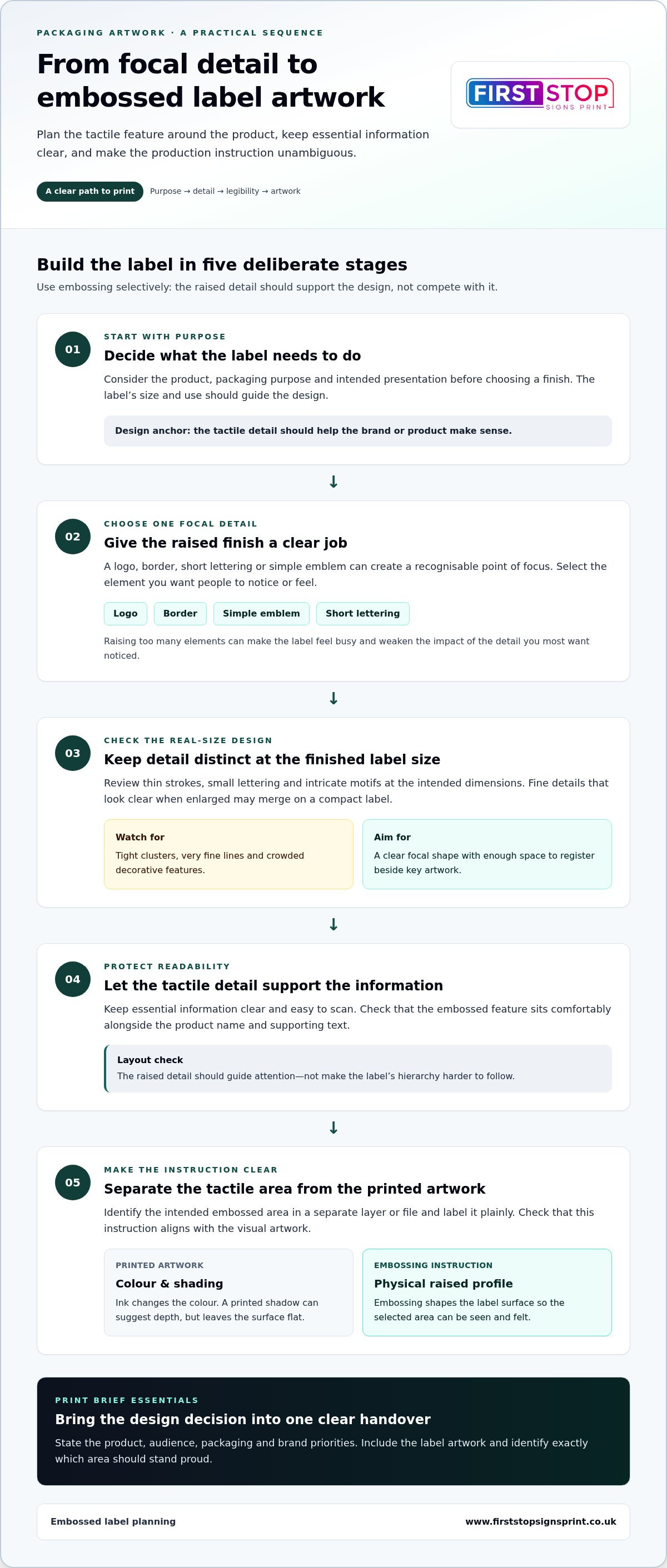
A strong embossed label starts with a practical brief, not just an attractive mock-up. Decide what the label needs to communicate, which detail should attract attention and how the packaging will be handled. Then prepare artwork that separates the intended tactile feature from the printed design. This makes the concept easier to review and gives production clearer instructions.
Use this checklist to move from idea to print-ready artwork:
- Set the packaging purpose. Note what the product is, who it’s for and what the label must help customers recognise or understand.
- Confirm the label size and layout. Work to the intended dimensions so you can judge whether the logo, text and tactile detail have enough space.
- Establish a reading order. Give the brand mark, product name and supporting information clear roles. Keep essential copy distinct from the embossed feature.
- Choose one focal area. Identify the mark or motif that embossing should emphasise. Avoid making every decorative element compete for attention.
- Prepare the embossing indication. Show the intended raised areas in a separate, clearly named layer or file, aligned with the main artwork.
- Review the complete design. Check legibility, contrast, alignment and reading order at the final size, then review a proof before production proceeds.
What should the embossing artwork layer show?
The separate layer or file should identify only the areas intended to be raised, using a consistent label such as “Emboss” so the instruction is unambiguous. Keep this mask aligned with the main label artwork: a shift between the two could change how the feature sits against printed elements. Flag overlaps, very small details and tight linework for review, as these may need simplifying to remain clear at the finished size.
Keep the tactile instruction separate from colour information. The printed artwork shows what customers will see; the embossing layer communicates where the surface treatment is intended. This distinction is useful for a custom label or sticker layout too. For related format considerations, the professional vinyl sticker printing guide offers further context.
How can you check label design before production?
Review the artwork at its actual size, not only enlarged on screen. Check that the brand mark remains recognisable, important product information is readable and the eye moves through the label in the intended order. Look closely at the boundaries between the embossed area and nearby copy or illustrations. If the design feels crowded, simplify the focal detail rather than reducing clarity elsewhere.
A proofing stage gives you a chance to review placement and the overall design before production proceeds. Bring the main artwork and the clearly aligned tactile layer together for that review. If you’re developing embossed labels for packaging, you can discuss your label artwork and packaging print brief with First Stop Signs Print.
Plan your packaging label project with First Stop Signs Print
A clear brief turns a packaging idea into useful direction for design and production. It helps keep the label focused on the product, the people it needs to reach and the brand impression you want to create. For embossed labels for packaging, explain both the label’s practical purpose and the tactile effect you hope to achieve. A visual reference can help, but include a written instruction too.
What to include in a packaging label brief
Start with the essentials: what the product is, who it is for and where customers are likely to see the packaging. A label on a small item may need a different layout from one viewed on a larger pack, so include the intended dimensions and any packaging context that affects how it will be seen or handled.
Then bring together the information and assets that will shape the design:
- Brand logo, imagery and any existing brand guidelines.
- Essential product copy and the order in which it should be read.
- Preferred colours, with examples if you have them.
- Label dimensions and a description of the packaging it will sit on.
- The tactile impression you want, including which feature should attract attention.
Be specific about the intended emphasis. For example, you might want the brand mark to feel prominent while keeping the product name and supporting copy easy to read. This gives the design a clear objective and helps distinguish the desired physical effect from the printed appearance.
From design direction to a print-ready label
First Stop Signs Print provides label and packaging printing, with design and production as part of its print service. A well-prepared brief gives the team a foundation for developing a layout that brings together brand elements and the packaging’s purpose. It also keeps the discussion centred on your priorities, rather than treating a finish as decoration on its own.
Choose one or two visual priorities for the label. A focal logo and a clear product name, for instance, can guide the layout without competing with essential information. Keep the tactile area distinct in the artwork and make its intended role easy to understand. The wider principles in this 2026 UK business sign design guide can also help frame decisions about visual identity and clear communication, while the focus here remains on packaging.
With the product, audience, dimensions, brand assets and finish direction set out, you’ll have a practical starting point for developing the artwork and reviewing it for production. Explore label and packaging printing with First Stop Signs Print.
Bring your packaging label idea into focus
Your next step is to turn the design intention into a brief that a print team can act on. Note what the label needs to achieve, which brand detail should stand out and how customers will encounter the pack. That gives the tactile treatment a clear purpose from the outset, rather than leaving it as a finishing touch without a defined role.
For embossed labels for packaging, keep the concept focused and the artwork instructions clear. First Stop Signs Print brings label printing, packaging printing, design and production together to support the wider print project. A well-considered brief makes it easier to discuss how the label’s visual direction can support the product and brand.
Explore label and packaging printing with First Stop Signs Print and take the next step towards a label that gives your packaging a distinctive, purposeful presence.
Frequently Asked Questions
Are embossed labels suitable for food packaging?
They can be suitable for food packaging, provided the label materials and construction are appropriate for the product and how it will be stored and handled. Consider whether the pack may face moisture, refrigeration, condensation or frequent contact, as these conditions can affect label performance. The embossed finish alone doesn’t establish whether a label is suitable for food use. Include the product type and packaging conditions in your print brief so they can inform design and production.
Can embossed labels be printed in colour?
Yes, a label can include printed colour as well as a raised feature. For example, the logo might use brand colours while a tactile area gives it additional definition. Treat the printed artwork and the intended raised area as distinct instructions, so each is clear in the design. Review the combined design at its actual label size rather than judging colour or relief in isolation.
Will an embossed label work on a curved jar or bottle?
It may work, but the label layout and construction need to suit the container’s shape. A small jar and a narrow bottle present different surfaces, and a label that crosses a tight curve may sit differently from one placed on a broad, flatter area. Include the container shape, label dimensions and intended position in the brief. If possible, assess a sample on the actual pack to check how the design sits when applied.
Does embossing make a packaging label waterproof?
No. Embossing changes the surface shape, but it doesn’t by itself make a label waterproof. Resistance to water depends on the label’s materials, adhesive and any protective treatment, as well as the conditions the pack will encounter. For a product kept in a fridge or used in a damp setting, describe those conditions before production planning. Don’t assume that a raised finish will protect printed information or prevent the label from lifting.
Can embossed labels be recycled with their packaging?
It depends on the label materials, adhesives and finishes, the packaging it is attached to, and the recycling process available for that packaging. The embossed detail alone doesn’t determine recyclability. If recycling is a design priority, include the pack type and your material requirements in the brief, then assess the complete label-and-pack combination. Avoid making recycling claims based only on the label’s appearance or whether its surface feels like paper.
How much do embossed packaging labels cost?
There isn’t one standard price for embossed packaging labels. Cost depends on the job’s specifications, including label size, order quantity, materials, artwork and the production method required for the finish. A clear brief helps establish what needs pricing: provide the dimensions, quantities, packaging context, print design and the areas intended to be raised. First Stop Signs Print can use those details to discuss the label and packaging print project.
Can embossed labels be applied by machine?
They may be suitable for machine application, depending on the label format and the equipment used. Applicators can require labels to be supplied in a particular arrangement, with consistent spacing and orientation, so the finished design must work within those requirements. Include the applicator’s specifications and how the label is positioned on the pack in the brief. This is especially useful for curved containers, where placement and label alignment affect the finished presentation.


