
A label can look polished on screen and still feel cramped or poorly balanced on a curved bottle. The challenge is getting the design, dimensions and print artwork to work together, so your wine is recognisable on the shelf and the essential details remain easy to read. With custom wine bottle label printing, small decisions about scale, colour and resolution can shape the finished result.
It’s understandable to want a distinctive design without risking text that’s hard to read or colours that look different in print. This guide explains how to plan a label around your bottle, prepare artwork for production and create a design that fits your brand or occasion.
We’ll cover practical choices for layout and legibility, along with artwork details that help prevent avoidable print issues. First Stop Signs Print provides a free digital proof at actual scale for custom orders, with unlimited revisions before sign-off. From our Romford workshop, we bring design and printing together, with UK-wide delivery.
Key Takeaways
- Measure the label area on the actual bottle before settling on a layout, and leave clear space around text and key design elements.
- Choose a label material and format with the bottle’s setting, handling and intended presentation in mind. Each option brings different visual and practical considerations.
- For custom wine bottle label printing, prepare vector artwork as an AI, EPS, SVG or PDF file with fonts outlined. Raster artwork should be supplied at 300 dpi.
- Use the full-scale digital proof to review proportions, colours and legibility, then request revisions before approving production.
- Prepare a clear brief and artwork or design requirements, then review the proof before production through First Stop Signs Print’s Romford workshop.
Why custom wine bottle label printing matters for your brand
A wine label does more than decorate a bottle. It identifies what’s inside and gives people an immediate impression of the producer, occasion or business behind it. A custom wine label is designed around a particular brand, product or occasion, bringing its identity and key details together on the bottle.
For a producer, custom wine bottle label printing can help build a recognisable visual identity across a range. Name, typography, colour and imagery work together to make different bottles feel like part of the same family, even when each wine has its own character. A clear, considered design also helps customers understand what they’re looking at without having to study the bottle for long.
The priorities depend on the purpose. A business label needs to support consistent branding and product recognition. A personalised bottle for a celebration can focus on a name, date or shared message instead. In either case, the design should feel intentional rather than crowded.
When bespoke wine labels make sense
Wineries can use a consistent label system to distinguish their wines while keeping a recognisable brand presence. A restaurant might want a house wine label that fits its setting and sits naturally alongside its wine list. Corporate gifts and special events have different aims: a tailored label can mark the occasion, identify the host or make a bottle feel personal to its recipient.
These are different design jobs, not simply different artworks. A producer may need repeatable branding across products, while an event organiser might need a one-off design. Make the intended use clear at the start. That helps determine which details deserve prominence and which visual choices best express the bottle’s personality.
What a wine label needs to communicate
Set a clear reading order. The brand or product name should be easy to find, supported by visual elements that express the intended identity. Decide what someone should notice first, second and third. Strong contrast, uncluttered spacing and readable type help establish that order. Decorative illustration, patterns or flourishes should support the message rather than compete with it.
Separate information from embellishment before finalising the layout. Product details serve a practical purpose, while graphics, colour and style create atmosphere. Both matter, but decorative choices shouldn’t obscure information. The history and components of wine labels offer useful background on how labels have developed and the kinds of details they can carry.
For wine sold in the UK, don’t assume an attractive design alone settles what must appear on the label. Requirements can depend on the product and where it is sold. Verify current legal labelling advice against official UK guidance before approving final artwork, and leave suitable space in the design for any required information. Planning early helps the visual identity and practical requirements work together.
Plan a wine label design that fits the bottle and the brand
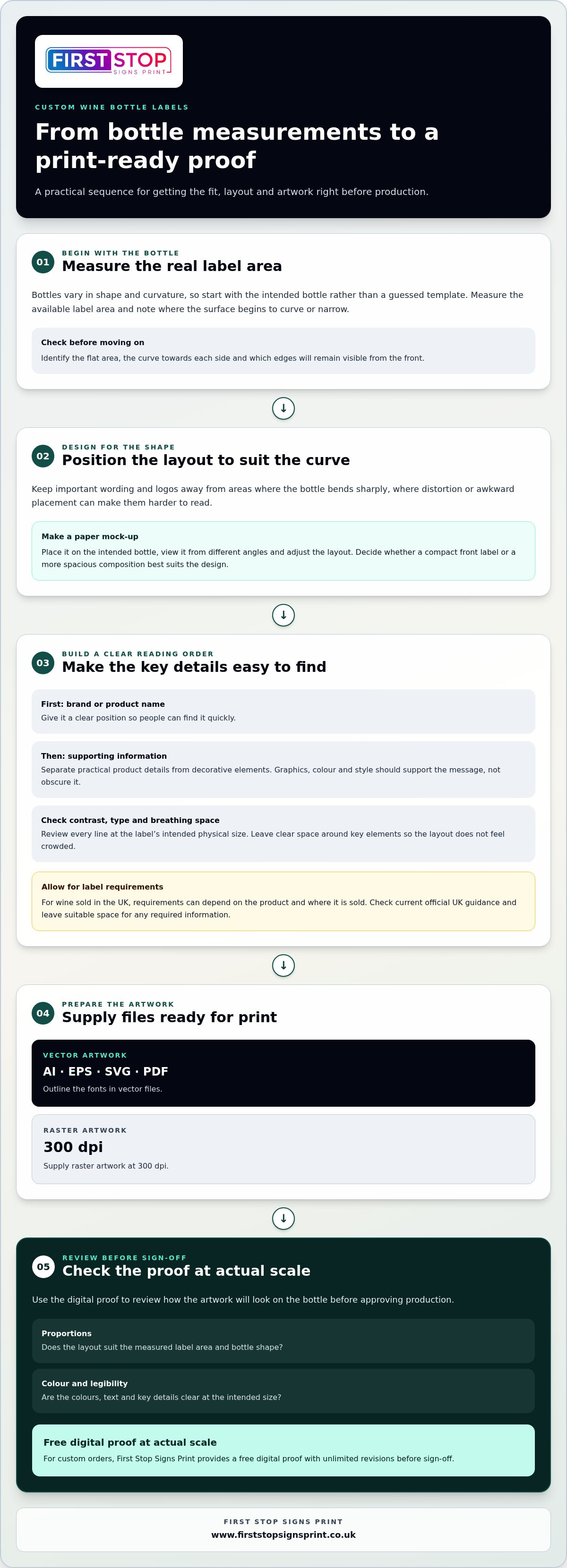
A strong design starts with the bottle, not a guessed template. Bottles differ in shape and curvature, so artwork that looks balanced on screen may sit awkwardly in real life. Before finalising a layout, measure the intended label area on the actual bottle and note where the surface begins to curve or narrow. Let the physical space guide the composition, rather than stretching a design to fit later.
Match the design to the bottle shape
Check the available flat area, the curve towards each side and the edges that will remain visible from the front. Keep important wording and logos away from areas where the surface bends sharply, as distortion or awkward placement can make them harder to read. A simple paper mock-up is a useful check: position it on the intended bottle, view it from different angles and adjust the layout before artwork sign-off.
Consider how much of the bottle the design should occupy and what impression that scale creates. A compact front label can make the brand name the clear focal point; a more spacious layout may give supporting details or imagery room to breathe. These are design decisions, not fixed measurements. For related print considerations, see this UK guide to professional vinyl sticker printing.
Build a clear visual identity
For related bottles, repeat recognisable elements such as the logo, type style and colour palette. You can vary a secondary colour or illustration to distinguish products while keeping the overall identity consistent. The Economic Impact of the UK Wine Industry provides wider sector context; for an individual label, the practical task is to make your product identity clear and coherent.
Check every line of wording at the label’s intended physical size. A typeface that looks elegant when enlarged on a monitor may become difficult to read on the bottle. Give the brand name a clear position, use contrast between text and background, and leave breathing space around key elements. Whitespace is useful design space, not wasted space: it helps the eye separate the main message from supporting detail.
Before artwork sign-off, check bottle fit, visual hierarchy, contrast and readability at the label’s actual size. This checklist brings the physical bottle and brand decisions together before production begins.
- Bottle fit: compare the layout with the measured label area and paper mock-up.
- Hierarchy: make the brand or product name easy to find first.
- Contrast: ensure lettering stands apart from its background.
- Readability: assess the smallest wording at actual size, not just on screen.
Bringing those checks into your wine label printing project early gives the design a clearer route from first concept to a bottle-ready layout.
Compare wine label material and format choices by use
The right label choice depends on more than appearance. Consider where the bottle will be presented, how it will be handled, how labels will be applied and what impression the brand should create. A bottle displayed for a special occasion has different practical demands from one handled regularly in a busy service environment. Set out these requirements before choosing a material or production format, so visual decisions support the real use.
For custom wine bottle label printing, treat material, finish and format as connected choices. A decorative surface may suit a distinctive brand, but it should still allow the wording and visual identity to read clearly. A material’s performance depends on its specification, not simply on whether it looks like paper or plastic.
Choose a material for the intended presentation
Paper-based labels can bring a familiar, tactile character that suits a traditional or crafted look. Synthetic label materials often have a smoother, more contemporary appearance. These are broad visual distinctions, not guarantees: the exact surface and performance depend on the selected material and its specification.
Think about the bottle’s surroundings. If it may be chilled, exposed to condensation or handled frequently, consider how those conditions could affect the label and adhesive. Don’t assume a material is water-resistant or durable from its name alone. Check that the selected specification suits the intended use, and assess the combination of material, adhesive and conditions rather than relying on a general category.
Finishes also influence presentation. A decorative finish can add visual emphasis or texture, while a simpler surface can keep attention on the brand and product name. Either way, avoid letting embellishment reduce contrast or obscure important wording. Choose an option that suits the brand and remains practical for the bottle’s expected setting.
Choose a format for the production workflow
Format is about how labels are supplied and applied, not just how the design looks. The application process, production volume and available handling equipment all affect what is practical. Labels on sheets can be handled individually from a flat sheet. Roll formats keep labels arranged on a continuous backing and may suit an application process designed for rolls. Individually supplied labels can also be useful for a small or one-off requirement.
Before settling on a format, map the workflow: who applies the labels, whether application is manual or equipment-led, and how the labels will be stored and handled before use. A format that fits the process helps keep application organised; a mismatch can add unnecessary handling. Include the intended workflow in the print brief.
Keep visual hierarchy consistent across the design, whatever material or format you choose. Clear emphasis, readable wording and a recognisable identity help the label work at a glance. The same principles underpin effective sign design for UK businesses, where layout must guide attention within a physical space.
Prepare wine label artwork and review the print proof
Good artwork preparation helps carry the design from screen to printed label with fewer avoidable issues. Before sending files, make sure the layout reflects the agreed label size and that all wording is final. A clear file and careful proof review work together: one prepares the design for production, while the other lets you inspect how it is arranged at actual scale.
Prepare the artwork file for print
Vector artwork is usually a practical choice for logos, lettering and illustrations because it can be resized without the same loss of sharpness as a raster image. Raster artwork is made from pixels, so its resolution needs to suit the final printed size.
Vector artwork uses paths that can scale cleanly, whilst raster artwork relies on pixels and should be supplied at 300 dpi for the intended print size.
Suitable vector formats are AI, EPS, SVG or PDF with fonts outlined; raster files are accepted at 300 dpi. Outlining fonts converts lettering into shapes, helping preserve the intended typeface if the original font isn’t available in the production workflow. Keep an editable copy before outlining, and proofread the wording first, as outlined text is no longer simple to edit as a font.
If you have specific colour references, include them in your project information. Pantone, RAL or CMYK values can help explain the colour you have in mind, but a screen preview isn’t a definitive print match. Colours can appear differently across screens and print processes, so review the proof as part of the approval process.
Use the proof to catch design issues
First Stop Signs Print provides a free digital proof at actual scale for custom orders, with unlimited revisions before sign-off. Use it as a practical review stage, not just a final glance. Check how the layout sits at its intended size and look for details that may be easy to miss when artwork is viewed enlarged on a monitor.
- Check the file: confirm the correct version is supplied and fonts are outlined where required.
- Read every line: check spelling, names, product details and punctuation carefully.
- Review the layout: inspect alignment, spacing, image placement and the order in which information draws the eye.
- Assess colour and legibility: check contrast and confirm smaller wording remains readable at actual scale.
- Request changes, then approve: use the proof revisions to resolve issues before signing off for production.
These checks reflect wider principles of UK business sign design: organise information clearly and make the main message easy to find. Once the proof is right, start your wine label printing project with artwork prepared for review and production.
Order custom wine bottle label printing from First Stop Signs Print
A clear brief helps turn your label idea into a practical print project. First Stop Signs Print provides in-house design and printing at its Romford workshop. Whether you have finished artwork or need design support, the steps are straightforward: explain the project, prepare the design, review the proof and approve production.
What to prepare before requesting a quote
Bring together the details that will shape the work. If possible, have the intended bottle available and note the label area you’ve measured. Share any existing artwork, your brand direction and how the bottle will be used, such as for a product range, a corporate gift or an event. An approximate quantity also helps frame the project. These details give the design process a clear starting point.
- The bottle or its relevant measurements
- Existing artwork, logos and brand references
- The intended use and visual direction
- An approximate quantity and any key project timings
From there, the project moves through these stages:
- Define the brief: set out the intended use, design priorities, bottle details and approximate order requirements.
- Submit artwork or design needs: provide prepared files or explain the design direction you want to develop.
- Review the proof: check the proposed label at actual scale and request changes before approval.
- Approve production: once you’re satisfied and have signed off the proof, the approved design can move into production.
From proof approval to delivery
Production follows proof approval and client sign-off. The standard turnaround is 5-10 working days after proof approval. An express service is available in 24-48 hours for a surcharge. These timings give you a useful planning point. Allow time for design and proof review before production begins, particularly if the labels are needed for a specific launch or event.
First Stop Signs Print serves Greater London, Essex and the Home Counties, with UK-wide delivery. The Romford workshop brings design and printing together in-house, supporting a connected route from the initial brief to the finished labels. Share your bottle details, artwork or design needs, and intended use to start your custom wine bottle label printing project.
Discuss your custom wine label printing project.
Turn your label idea into a considered design
Your label is a lasting part of how people recognise your wine. Use the next step to bring your brand priorities into focus: what should customers notice first, what should the design say about the bottle, and how will it sit within your wider identity? A clear brief gives those decisions direction and helps turn an initial idea into artwork ready for production.
Custom wine bottle label printing works best when the design and practical details of the finished bottle are considered together. First Stop Signs Print brings in-house design and printing together at its Romford workshop, with an actual-scale digital proof and unlimited revisions before sign-off. That gives you room to refine the design and consider it carefully before production begins.
Whether you’re developing a label for a wine range or creating something for a particular occasion, you don’t need every detail resolved before starting the conversation. Share your bottle, artwork and ideas, and take the next step towards a label that fits your project.
Discuss your custom wine label printing project and move your idea towards a polished bottle.
Frequently Asked Questions
What size should a custom wine bottle label be?
There’s no single label size that suits every wine bottle. Measure the usable area on the actual bottle, including where its surface begins to curve, then check the layout against that space. As a practical starting point, mark the proposed width and height on paper and wrap it around the bottle. This helps reveal whether edges, lettering or important design details sit awkwardly before you finalise the artwork.
Can I use my own design for a custom wine bottle label?
Yes, you can provide your own label artwork. Before sending it for custom wine bottle label printing, check that it suits the intended bottle and that the wording and images are final. Keep an editable copy of the design, particularly if you’re supplying outlined fonts. If you need a design developed, share your brand references and ideas so the artwork can be planned around the project.
What file format should I use for wine label printing?
AI, EPS, SVG or PDF files with fonts outlined are suitable for vector artwork. Raster files are accepted at 300 dpi. Outlining fonts helps preserve their appearance if the production workflow doesn’t have the original typeface. Before exporting, check that the document is set up at the intended print size and that linked images are included. Keep a separate editable version so you can make future changes to the text or design.
How do I make sure text on a wine label is readable?
Review the wording at its intended printed size, not only zoomed in on a screen. Keep the brand and product name easy to find, use clear contrast between text and background, and avoid placing small lettering over detailed imagery. A useful check is to print a draft at actual size and view it at a normal reading distance. If words feel cramped or unclear, simplify the layout or give them more space.
Can a wine bottle label include variable details for an event or batch?
A label design can make room for details that differ, such as an event name, date, recipient or batch reference. Keep the main brand artwork consistent, then identify exactly which wording changes between versions. Prepare and proof each version carefully so names, dates and batch details are matched to the right artwork. Include changing information clearly in the project brief and supplied files.
What information must appear on a wine bottle label in the UK?
Required details depend on the wine and where it is sold. Information may include the product category, alcohol strength, net quantity, origin, lot or batch identification, responsible business details and allergen declarations where applicable. UK rules can vary by nation and sales route, so treat this as a planning prompt, not a complete legal checklist. Check current official UK guidance before approving the final label, especially for allergen wording and business address details.
How long does custom wine bottle label printing take?
Standard production takes 5-10 working days after proof approval. An express service takes 24-48 hours and carries a surcharge. These timings begin after the design proof has been approved, so include time beforehand to prepare artwork, review the proof and make any required changes. If your labels are for a planned launch or event, allow room in your schedule for approval as well as production.


