

Choose 3D wall panels to add texture and depth to a plain wall and create a clear focal point. They need a clean, dry, reasonably flat surface, and careful measuring and cutting help achieve a neat finish around sockets, switches and corners. This guide to installing 3D wall panels explains how to plan the layout and prepare the wall before fixing panels in place.
A raised pattern can make a feature wall feel more considered, but the finished look also depends on practical details. The adhesive must suit both the panel and the wall surface, and accurate measuring helps edges fit neatly around fixtures.
This guide explains how to choose between self-adhesive panels and construction adhesive, gather suitable tools, plan for trimming and work safely around electrical fittings. You’ll also learn how to handle corners and edges, so you can judge whether the job is manageable as a DIY project or better suited to professional installation.
Key Takeaways
- Prepare a clean, dry, reasonably flat wall so panels have a suitable surface to adhere to.
- Choose self-adhesive panels or construction adhesive according to the panel and wall surface, then follow the adhesive’s curing guidance.
- Measure and mark cut-outs carefully; turn off the power before cutting around sockets or switches.
- Use angled cuts at corners to help create a neater join and reduce visible gaps.
- Gather a level and suitable cutting tools, and allow around 10-15% extra material for wastage.
Why Choose 3D Wall Panels?
Raised patterns add depth to a plain wall and give a feature wall more impact. A clean, dry, reasonably flat surface is essential, and measuring the wall first helps you plan the layout and estimate how much material you’ll need.
Can 3D wall panels go over wallpaper or uneven walls? A smooth surface gives adhesive a better grip, so remove textured wallpaper and correct uneven areas first. For bathrooms, make sure the wall is completely dry; resolve any damp before installation.
Wear eye protection and handle cutting tools carefully. Before cutting around sockets or switches, turn off the power at the circuit. Never cut near live electrical fittings.
For a practical demonstration of fitting panels and cutting around fittings, watch Living Jill’s Style:
- Inspect and clean the wall. Remove dust, grease and loose material so adhesive meets the wall, not debris. Check the full surface for damp, flaking paint, cracks or high spots. Fix the source of damp before covering the area. A panel may hide a mark, but it won’t resolve the underlying problem.
- Prepare the surface. Fill small holes and cracks, then smooth the filler once it has dried. Bare plaster or brick needs primer to provide a sound surface for adhesive. If the wall has latex paint, allow at least 7 days for it to cure before fitting panels.
- Measure and plan the layout. Measure the wall’s width and height, then use those measurements to estimate panel quantities. For example, a 12 ft by 8 ft wall measures 96 sq ft and needs 18 panels of the stated size, rounded up to two boxes of 10. Allow extra material for cuts and awkward edges.
- Acclimatise and dry-fit. Leave PS panels in the room for at least 24 hours before installation. Lay out the first row and check how its edges meet corners and fittings. Mark cuts before applying adhesive, so you can adjust the arrangement while panels are still loose.
- Paint after fitting. Check whether panels are primed, as some have only one primed side. Water-based paint is recommended for the panels, and two coats usually give more even coverage. Wait 24 hours after installation before painting, and use colour-matched filler on small pinholes in MDF panels.
Self-adhesive panels versus construction adhesive
Match the fixing method to the panel type and wall surface. Follow the manufacturer’s instructions for choosing and applying adhesive, as well as its curing time.
-
Choose an adhesive method
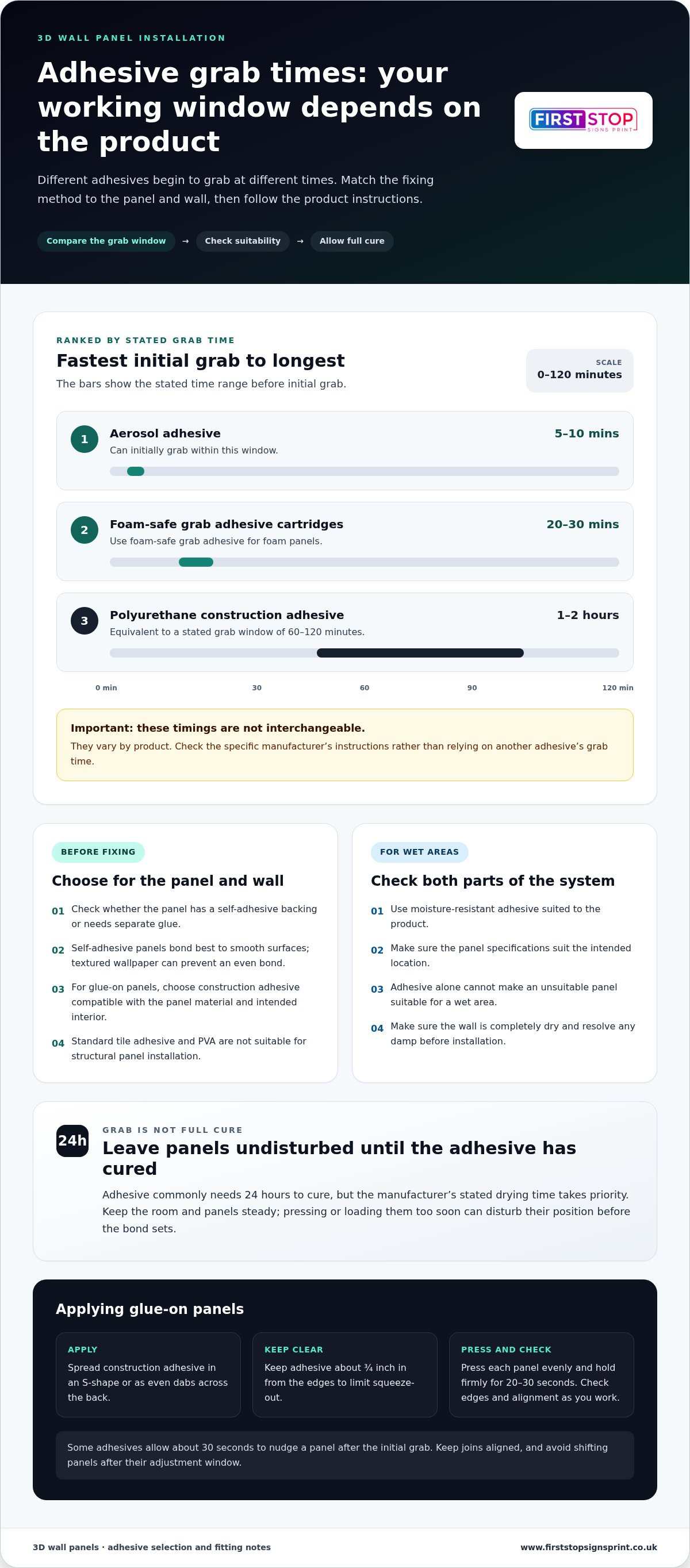
First check whether the panels have a self-adhesive backing or need separate glue. Self-adhesive panels bond best to smooth surfaces; textured wallpaper can prevent an even bond. For glue-on panels, use construction adhesive compatible with the panel material and intended interior, and follow the product label. Standard tile adhesive and PVA aren’t suitable for structural panel installation.
-
Apply adhesive to the panels
For glue-on panels, apply construction adhesive in an S-shape or as even dabs across the back. Keep the adhesive about 3/4 inch in from the edges to limit squeeze-out. Cover the back without laying it on so heavily that adhesive escapes when pressed. Foam panels need foam-safe grab adhesive, while wet areas need moisture-resistant adhesive suited to the product.
-
Fit panels with adhesive
Position each panel against the wall and press it evenly into place. Hold it firmly for 20 to 30 seconds, checking the edges and alignment as you work. Some adhesives allow about 30 seconds to nudge a panel after the initial grab. Linear 3D wall coverings are installed with adhesive, so keep joins aligned and avoid shifting panels after their adjustment window.
- Test the first panel. Before fixing a full row, check how the adhesive behaves on one panel. Aerosol adhesive can initially grab in 5 to 10 mins, whilst foam-safe grab adhesive cartridges have a 20 to 30 mins grab time. Polyurethane construction adhesive takes 1 to 2 hours to grab. These timings differ, so use the specific product instructions rather than treating them as interchangeable.
- Allow the adhesive to cure. Leave panels undisturbed until the adhesive has cured fully before adding pressure or weight. Adhesive commonly needs 24 hours to cure, but the manufacturer’s stated drying time takes priority. Keep the room and panels steady during this period; pressing or loading them too soon can disturb their position before the bond sets.
- Recheck wet-area suitability. In bathrooms, select moisture-resistant adhesive and make sure the panel specifications suit the intended location. Adhesive alone won’t make an unsuitable panel suitable for a wet area. For a tailored finish, explore 3D wall panels designed for your space.
Cutting panels around outlets and corners
Measure each corner before cutting: even a small error can leave a visible gap. Choose a mitre or corner trim that suits the panel and the finish you want.
-
Align panels at corners
Dry-fit panels at each internal or external corner before applying adhesive. Check that the raised pattern meets neatly and that the first panel sits level. For a connection at one corner, add approximately 1 inch to the panel length. For a two-corner connection, include an additional 1.5 inches, then trim to fit.
-
Fit trims or mitre corners
Choose a corner trim when you want to cover exposed panel edges or simplify the join. Metal trims can protect WPC panel edges from wear. For a closer finish, cut adjoining panels at a 45° mitre rather than butting their square edges together. Match the trim or mitre approach to the panel profile and corner shape.
- Mark the mitre carefully. Mark the cut line on the back of the panel, then guide the blade from the front edge towards that line at 45 degrees. This bevel allows adjoining faces to meet across the corner. Cut a small offcut first to check the angle and direction. Reverse the bevel for the adjoining panel where needed.
- Choose the tool for the panel. PS panels can be cut with regular tools, while an electric saw can make smooth edges in WPC panels. Choose a saw and blade suited to the MDF panel, and check the tool instructions before cutting. Support the panel close to the cut, and follow the tool’s instructions to keep the cut controlled.
- Trim in stages. Cut slightly outside your marked line, then test the panel against the corner. Remove small amounts until the fit is even along the edge. A mitre cut can take about 90 seconds once you’ve learnt the technique, but accurate marking matters more than speed. Recheck the corner before fixing the panel permanently.
- Finish the joined edges. Press each panel into its planned position and inspect the seam from the room’s usual viewing angle. If using adhesive, allow it to cure fully before putting pressure on the panels; this commonly takes 24 hours, subject to the product instructions. A tidy corner gives an accent wall a continuous finish instead of a broken pattern.
- Plan cuts around fittings. Measure the fitting and mark its position on the panel before cutting. Turn off the power before cutting around an outlet or switch, and use a jigsaw for the opening. Test the cut-out against the fitting before fixing the panel, leaving the faceplate able to cover the panel edge.
Cutting panels around edges, sockets and switches
Choose a cutting tool suited to the panel material, then mark the edges or openings before cutting. For sockets and switches, switch off the power first and use a jigsaw to make the cut-out.
-
Cut panels to size
Measure the wall edge or fitting position and transfer those marks onto the panel. PS panels can be cut with regular tools. An electric saw can produce smooth edges in WPC panels, whilst MDF panels need a handsaw or power saw with a blade designed for silicone timber or MDF. Tough polyurethane panels can be cut with a hand saw or other suitable tools.
-
Cut openings for sockets and switches
Switch off the power before cutting near any socket or switch. Measure the fitting, mark its position on the panel, then use a jigsaw to cut the opening. Keep the cut within the marked outline so the faceplate can cover the panel edge. After cutting, fit the socket and cover it with a faceplate that suits the panel design.
- Check the panel material. Don’t assume every panel cuts in the same way. A regular hand tool may suit PS, whilst WPC benefits from an electric saw for a smooth edge. MDF calls for a blade intended for its material. For polyurethane panels, a hand saw is one suitable option. Check the panel’s product guidance before choosing a blade.
- Mark the cut on the reverse. Use a straightedge to draw the cutting line on the back of the panel. For a socket opening, mark the fitting’s position and dimensions carefully. Check that the design will sit upright once installed, and that the hole won’t intersect a raised section. This planning helps prevent a misplaced cut from disrupting the panel’s pattern.
- Cut slowly and support the panel. Place the panel on a stable work surface, with the cut area supported and clear beneath. Guide the saw along the marked line without forcing the blade. If using a utility knife for a suitable panel, keep the blade sharp and replace it when needed. A sharp blade helps keep the cut controlled and the edge clean.
- Test the fit before fixing. Hold the cut panel in position and check its edges against the wall and fitting. Trim only small amounts if the opening needs adjustment. A faceplate should cover the cut edge without being obstructed by the panel’s raised texture. Once the panel fits, install it using the adhesive method suited to its material and location.
- Take extra care in damp areas. Moisture-resistant panels may suit bathroom dry zones, but cutting doesn’t make a panel suitable for every wet location. Keep cut edges and openings consistent with the product’s intended use. Around electrical fittings, keep the power off during the cutting work and avoid cutting into the wall itself.
Tools and materials for panel installation
Gather your tools before starting, so measuring, cutting and fitting follow a clear sequence. Check the panel material and finish first, as these determine the suitable cutting tools and adhesive.
-
Gather installation tools and materials
Collect a tape measure, pencil, straightedge and level for marking and alignment. A level of at least 24 inches helps keep rows straight. Set out the suitable saw for your panel material, plus adhesive for glue-on panels. Keep a clean, stable work area ready for dry-fitting, and allow 10-15% extra material for cuts and wastage.
- Match tools to the panel. PS panels can be cut with regular tools, while an electric saw can produce smooth WPC edges. MDF panels need a handsaw or power saw with a blade designed for silicone timber or MDF. Tough polyurethane panels can be cut with a handsaw or other tools. Choose based on the panel material, not just its surface texture.
- Prepare a measuring kit. Measure the wall and record each edge, corner and obstruction before marking panels. A pencil and straightedge make cut lines easier to follow. Use a level frequently during installation, checking rows as you work. These simple tools help maintain consistent alignment across a textured layout, where uneven joins can interrupt the pattern.
- Check panel thickness and material quality
Check the product specification for the PVC panel’s stated thickness and material details. Compare panels in the same pack for consistent thickness, intact edges and an even surface. Thickness alone doesn’t guarantee a particular result: composition, intended use and fitting method also matter. Check the texture and colour before installation, especially if you plan to paint the panels.
- Plan the finish and quantity. Measure the wall area to estimate how many panels the project needs, then add 10-15% for trimming and wastage. Check that the chosen panels share the same finish and texture before laying them out. If you intend to paint them, confirm the surface is prepared for paint and follow the panel instructions for a consistent appearance.
- Organise the work area. Keep panels flat and protect their edges while measuring and cutting. Place adhesive and tools within reach, but keep the cutting area clear. A level, suitable saw and planned material quantity reduce interruptions between fitting each panel. For help with a larger wall-panel project, discuss professional 3D wall panel installation.
First Stop Signs Print: Label Printing
First Stop Signs Print creates bespoke 3D wall panels and provides professional installation for a polished finish. If your layout includes tricky corners, detailed cut-outs or a large feature wall, professional fitting can help manage those practical details.
For a straightforward wall with a smooth surface and simple cuts, this guide can help you plan a DIY installation. For a more involved project, First Stop Signs Print can help bring the panel design and installation together. The company also offers label printing for businesses that want to carry their visual identity onto packaging.
Contact First Stop Signs Print to discuss your 3D wall panel project.
Shape the finish around your space
Before choosing a panel design, decide what you want the finished wall to communicate. At home, a textured feature can create a stronger focal point. In a commercial interior, it can express your business’s character and make the space more memorable.
Use this guide to installing 3D wall panels as a starting point, then consider how the chosen design will work with lighting, furniture and the rest of the room. A consistent visual direction can also connect a feature wall with other branded details across your premises.
First Stop Signs Print offers 3D wall panels, custom business signs and label printing. These options can help businesses carry a considered look from their physical space to their packaging.
To discuss your project, contact First Stop Signs Print. A clear design direction is a strong first step towards a distinctive finished space.
Frequently Asked Questions
What tools and materials are needed to install 3D wall panels?
Gather a tape measure, pencil, straightedge, level, suitable cutting tool and the adhesive specified for your panels. A long level helps you spot alignment drift across a row, while a straightedge guides clean cuts. Match the saw or blade to the panel material instead of using one tool for every type. Keep spare material for offcuts and mistakes, and prepare a stable surface for marking and cutting.
How do you prepare a wall for 3D wall panel installation?
Remove loose paint, dust, grease and wallpaper that could interfere with adhesion. Check for damp and deal with its cause before covering the surface. Bare plaster or brick needs primer to provide a sound grip. For latex-painted walls, allow at least 7 days for the paint to cure. Fill small defects and smooth them before fitting. A properly prepared wall helps panels sit evenly and reduces weak adhesive contact.
How do you measure and plan the layout for 3D wall panels?
Measure the wall’s width and height, then compare its area with the coverage stated for your panels. A 12 ft by 8 ft wall measures 96 sq ft; the example in this guide to installing 3D wall panels uses 18 panels, rounded up to two boxes of 10. Allow 10-15% extra for trimming and wastage. Sketch the layout, marking corners and fittings, so narrow offcuts don’t fall in prominent places.
How do you cut 3D wall panels around sockets, corners and edges?
Switch off the power before cutting near a socket or switch. Measure the fitting, mark its position on the panel and use a jigsaw for the opening. Test the cut-out before fixing the panel, then cover its edge with the faceplate. At corners, a 45° mitre can create a neat join. Add approximately 1 inch for a connection at one corner, or 1.5 inches for a two-corner connection.
What adhesive is best for 3D wall panels on plaster, brick or painted walls?
Choose an adhesive compatible with both the panel material and the prepared wall. Prime bare plaster or brick, and make sure painted walls have a sound, cured finish. Construction adhesive can secure glue-on panels, but standard tile adhesive and PVA aren’t suitable for structural panel installation. In bathrooms or other damp-prone areas, use moisture-resistant adhesive and follow the product instructions for that location.
What are the step-by-step instructions for fitting 3D wall panels?
Prepare the wall, plan the layout, then dry-fit panels and mark cuts or openings. Apply adhesive as directed and position each panel against your layout marks. Press evenly, checking alignment as you work and adjusting within the adhesive’s working time. Continue across the wall, then leave the installation undisturbed for the stated curing period. This guide to installing 3D wall panels provides the sequence; the panel and adhesive instructions determine the specific fitting details.
How do you finish joints, corners and edges on 3D wall panels?
Align the pattern before fixing adjoining panels, then choose a finish suited to the edge. A 45° mitre can help panels meet neatly at internal or external corners. Trims can cover exposed edges, while metal trims can protect WPC panel edges from wear. For painted panels, two coats usually provide more even coverage. Fill small pinholes in MDF with colour-matched wood filler, smooth the repair and touch up the paint.
Can 3D wall panels be installed in bathrooms or kitchens, and what moisture precautions are needed?
Some moisture-resistant panels suit bathroom dry zones or areas above waterproof features, but the wall must be completely dry before installation. Use moisture-resistant adhesive and follow the panel’s location guidance. In kitchens, keep PVC panels 15-20 cm from electric or induction cooktops. Standard PVC panels aren’t suitable for direct installation behind a gas stove. Moisture resistance doesn’t make every panel suitable for wet locations or heat-exposed surfaces.


